Finance Apps: A Guide to Budgeting and Money Management App

Co-Founder
Finance apps are a set of tools covering budgeting, saving, and banking, each built to help users manage money through Open Banking-enabled personal money management software. Features include automatic expense categorisation, budgeting dashboards, bill alerts, and savings-goal tracking, with different types, including cryptocurrency, investment, and money transfer.
The best household budgeting apps stand out through shared account access for families, letting London households track joint spending and school-fee savings from one dashboard. The guide walks through how the apps work, what separates a finance app from a budgeting app, and what goes into app development for a secure money management tool.
What Is a Finance App?
A finance app is a personal money management software that links bank accounts, credit cards, and investment platforms through Open Banking APIs to give users a single view of their finances. Over 7 million consumers and businesses in the UK, including 750,000 SMEs, use Open Banking-enabled apps to manage money and make payments, per the Joint Regulatory Oversight Committee, 2023.
Finance app applies automatic categorisation to sort transactions into groups (groceries, utilities, and bills), giving users a clear spending breakdown. Core functions cover budgeting tools, savings-goal tracking, and net worth dashboards, with tokenised connections keeping bank credentials secure.
What are the Types of Finance Apps?
The types of finance apps are personal finance apps, budgeting apps, investment apps, savings apps, banking apps, debt management apps, tax management apps, cryptocurrency apps, and money transfer apps. These apps serve different purposes, helping individuals manage their finances in various ways. From managing day-to-day expenses to long-term investment strategies, they provide tools that simplify financial tasks, improve budgeting, and help users stay on track with their financial goals.
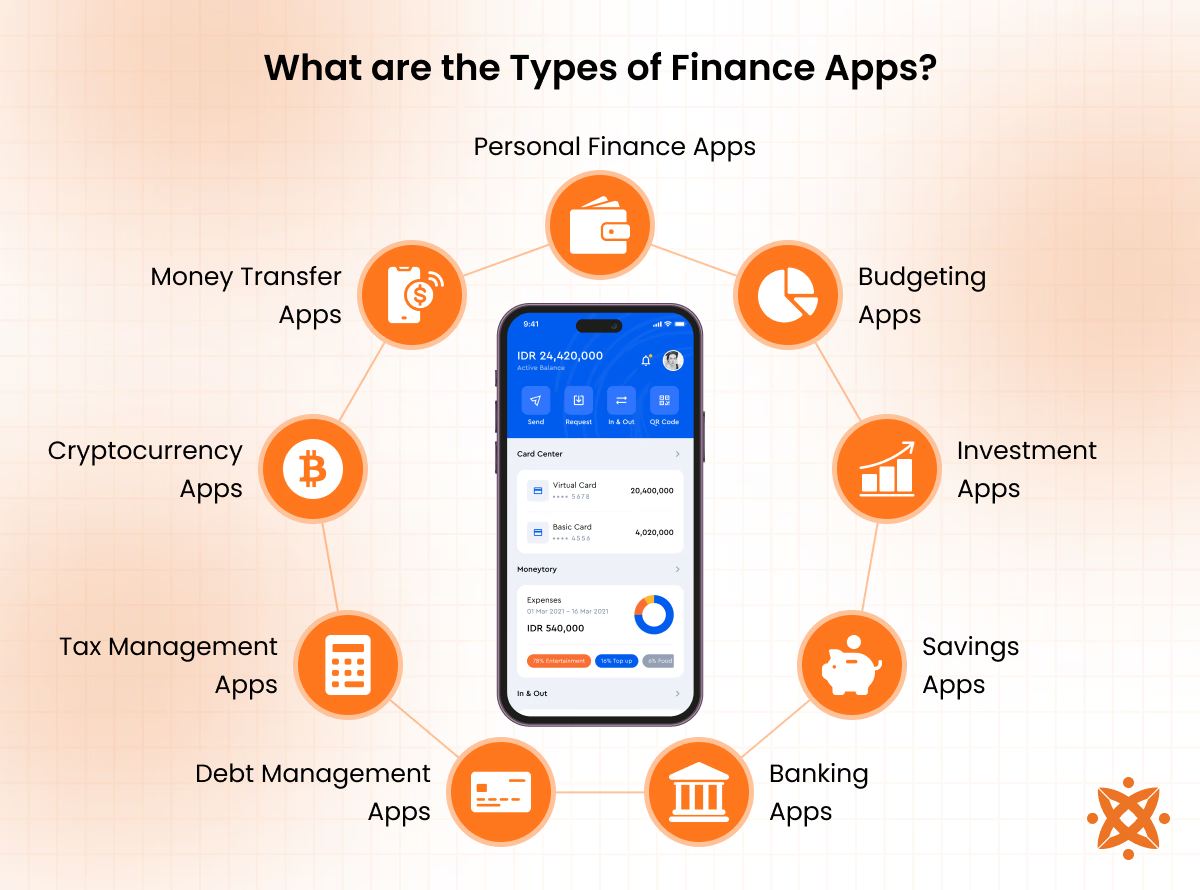
The types of finance apps are as follows:
- Personal Finance Apps
- Budgeting Apps
- Investment Apps
- Savings Apps
- Banking Apps
- Debt Management Apps
- Tax Management Apps
- Cryptocurrency Apps
- Money Transfer Apps
1. Personal Finance Apps
Personal finance apps are designed to help individuals manage their entire financial lives in one platform. They track income, expenses, investments, and savings and offer an overview of one's economic health. These apps help users set financial goals, monitor spending patterns, and analyse their financial habits. Some examples of personal finance apps include Mint, YNAB (You Need A Budget), and PocketGuard.
The personal finance app simplifies financial management by consolidating all financial activities into a single interface. With features like automatic transaction categorisation, budget creation, and goal tracking, these apps help users stay on top of their financial game. They also provide insights into spending patterns and suggest improvements to help users achieve economic stability and success.
According to a report by Statista, in 2023, Capital One led the personal finance apps market in the UK, achieving an aided brand awareness of 59.73% among consumers.
2. Budgeting Apps
Budgeting apps focus on helping users create and stick to a budget. They allow users to set monthly or yearly food, entertainment, and transportation budgets. Budgeting apps also ensure that users remain within their financial limits by tracking expenses. Some popular budgeting apps include EveryDollar, GoodBudget, and PocketGuard. According to Fact Mr, the personal finance mobile app market is expanding from an estimated $2.9 billion in 2024 to a colossal $12.58 billion by 2034, fueled by a CAGR of 15.8%.
The basic function of a budgeting app is to provide users with a clear and organised view of their financial inflow and outflow. These apps help individuals and small businesses allocate a certain amount of money to different categories and notify them when they approach or exceed their budgeted amounts. Budgeting apps also offer features like automatic expense tracking, bill reminders, and financial goal-setting to make budgeting effortless.
3. Investment Apps
Investment apps are digital platforms that allow individuals to invest in stocks, bonds, mutual funds, and other securities without the need for a traditional broker. These apps cater to beginner and experienced investors, offering basic tools and advanced features to help users make informed investment decisions. Robinhood, E*TRADE, and Acorns are among the top investment apps today.
Investment apps provide access to various investment options and allow users to build diversified portfolios. They offer many features, including real-time stock tracking, investment advice, automated investing, and portfolio rebalancing. Some investment apps also provide educational resources to help users understand the basics of investing, making them ideal for newcomers to the market.
Investment apps aim to democratise investing by making it more accessible and affordable for everyone. According to a report by Scoop Market, the Investment Apps Market is expected to reach $254.9 billion by 2033, projected at a CAGR of 19.1% during the forecast period.
4. Savings Apps
Savings apps are financial apps designed to help users save money automatically or manually. They allow individuals to set aside small amounts for specific goals, such as vacations, emergencies, or large purchases. Saving apps like Digit, Qapital, and Simple use algorithms or rounding features to help users save without feeling the impact. According to Think with Google, 73% of smartphone users have used a saving app to manage their finances in 2023 monthly.
The primary purpose of a savings app is to encourage users to save money effortlessly by automating the process. These apps analyse spending patterns and automatically transfer small sums of money into savings based on preset criteria, such as rounding up purchases or setting up recurring transfers. Some savings apps also offer high-yield savings accounts or give users cashback rewards to incentivise saving.
5. Banking Apps
Banking apps provide digital access to a user's bank account, allowing them to manage their finances on the go. These apps allow users to check balances, transfer money, pay bills, and view transaction history. Today, almost every bank has a banking app that enables account holders to manage their accounts remotely.
Traditional banks like Chase, Wells Fargo, and Bank of America and digital-only banks like Chime and Revolut have banking apps. According to a report by Statista, 43.5% of households in the UK use mobile banking. The age group with the highest mobile banking penetration is 15-24, indicating a strong preference for digital banking solutions among younger consumers.
The purpose of a banking app is to offer users easy and convenient access to their bank accounts and services. These apps allow for features such as bill payments, mobile check deposits, account transfers, and money management tools. Modern banking apps also feature robust security measures like two-factor authentication to protect users' financial information and provide peace of mind.
6. Debt Management Apps
Debt management apps are designed to help users manage and pay down their debt. Apps like Debt Payoff Planner, Tally, and Mint allow users to track credit card balances, loans, and other debts and create repayment plans that suit their budgets. According to Money Management International, Undebit has helped eliminate over 700,000 debts. More than 120,000 active users are working to pay down $8.7 billion in debt, showcasing its effectiveness in tackling financial burdens.
Debt management apps aim to help users organise and prioritise their debts, making paying them off more efficient and easier. These apps feature tools that calculate minimum payments, suggest debt repayment strategies (such as the snowball or avalanche method), and offer reminders to ensure users stay on track. Debt management apps aim to alleviate the stress of managing multiple debts by providing a clear path to debt freedom.
7. Tax Management Apps
Tax management apps are designed to help individuals and small businesses track and manage their taxes, making the filing process easier. These apps allow users to organise their financial documents, track expenses, and calculate potential tax deductions.
TurboTax, H&R Block, and TaxSlayer are tax management apps that simplify the tax preparation and filing process. They offer tools that automate calculations and ensure users don't rely on deductions or credits. These apps guide users through the process with step-by-step instructions, supporting self-employed individuals, freelancers, and small businesses. Tax management apps also allow for easy e-filing and direct deposit of refunds.
According to a 2023 report by Statista, TurboTax dominated the tax preparation market with a 53.17% share. Credit Karma also held a significant portion, accounting for 48.42% of the market.
8. Cryptocurrency Apps
Cryptocurrency apps provide users with a digital platform to buy, sell, and manage their investments in digital currencies such as Bitcoin, Ethereum, and Litecoin. These apps also allow users to track prices, trade digital currencies, and store them in secure wallets.
Binance and Bybit are two prominent cryptocurrency apps. Binance boasts over $23 billion in trading volume, supporting 454 coins and fiat currencies like EUR, GBP, and BRL. On the other hand, Bybit has a trading volume of $8.19 billion, featuring 720 coins and supporting fiat currencies such as USD, EUR, and GBP.
Cryptocurrency apps' main purpose is to provide users with a secure and efficient way to manage their cryptocurrency portfolios. These apps offer features such as real-time price tracking, access to various cryptocurrencies, and secure wallet storage options. Some apps also provide educational content to help users understand the complexities of the cryptocurrency market, making them ideal for both beginners and seasoned investors.
9. Money Transfer Apps
Money transfer apps allow users to send and receive money quickly and securely across different platforms with minimal fees. These apps commonly send money to family and friends or pay for goods and services. PayPal, Venmo, and Zelle are among the most popular money transfer apps globally.
According to Verified Market Research, the money transfer app market size was valued at $20.15 billion in 2023 and is projected to reach $65.38 billion by 2031, growing at a CAGR of 18.3% during the forecast period 2024-2031.
Money transfer apps simplify money transactions across geographical boundaries without the need for traditional banking systems. These apps offer features like instant money transfers, direct deposits, bill payments, and splitting payments among groups. Money transfer apps link to users' bank accounts or credit cards and provide real-time updates to ensure transactions are completed smoothly and securely.
What Is the Difference Between Finance Apps and Budgeting Apps?
The difference between finance apps and budgeting apps is shown in the table below.
| Feature | Finance Apps | Budgeting Apps |
|---|---|---|
| Primary Purpose | Provides a complete overview of personal finances, including bank accounts, investments, credit, and net worth. | Helps users manage spending and stay within monthly or category-based budgets. |
| Expense Tracking | Automatically tracks transactions by aggregating data from multiple financial institutions through Open Banking APIs. | Tracks expenses manually or automatically and organises them into budget categories. |
| Budget Creation | Includes budgeting as an optional feature with limited customisation. | Budget creation is the core feature, supporting methods such as zero-based and envelope budgeting. |
| Bill Management | Offers bill reminders, due-date tracking, and payment scheduling tools. | Provides basic bill reminders linked to budget categories and monthly spending plans. |
| Investment Tracking | Supports portfolio monitoring, including stocks, pensions, ISAs, and other investment assets. | Investment tracking is rarely included because it falls outside the app's primary purpose. |
| Savings Goals | Creates savings goals based on overall financial health and net worth. | Focuses savings goals on monthly surplus and planned budget allocations. |
| Banking Integration | Connects multiple bank accounts using PSD2-compliant Open Banking APIs. | Typically connects one or a few bank accounts, with some apps supporting manual data entry. |
| Target Users | Designed for users who want a comprehensive view of their financial position. | Designed for users who want better control over day-to-day spending and monthly budgets. |
Are Free Budgeting Apps Effective for Long-Term Money Management?
Yes, free budgeting apps are effective for long-term money management. Budgeting app builds tracking habits without a subscription barrier for a long time. Free budget apps recorded 203,000 users over one year, with 103,000 completing the process and generating results, as per Gov.UK data.
Limitations exist, but free tiers lack investment tracking and multi-bank aggregation, which weaken oversight as finances grow more complex.
How Do Budgeting Apps Help Improve Financial Habits?
Budgeting apps help improve financial habits through automatic expense categorisation, which makes overspending visible in real time rather than at month-end. The habits build routine like a "pay yourself first" transfer, moving a fixed sum into savings before other expenses are settled.
Financial habits support daily cash-flow tracking, letting users check spending against monthly targets, plus responsible debt paydown by flagging high-interest balances early. A monthly "money date" check-in, reviewing goal progress inside the app, keeps the habits consistent over the long term.
How Can Personal Finance Apps Help Users Manage Their Money?
Personal finance apps help users manage money by computing accounts, credit cards, and investments into one dashboard through Open Banking APIs. The consolidated view lets users track net worth, spot unusual charges, and act on real-time alerts rather than waiting for a monthly statement.
How Do Budgeting Apps Help Track Expenses Effectively?
Budgeting apps track expenses effectively by pulling transaction data automatically and sorting it into categories (groceries, transport, and bills). The automatic categorisation removes manual entry, letting users see spending patterns and catch overspending within the same week it happens.
How Can Household Budgeting Apps Support Family Financial Management?
Household budgeting apps support family financial management through shared account views and permission-based access, letting partners see the same spending data at once. Joint goal-setting features, like a shared savings target for school fees or holidays, keep the parties aligned on family priorities.
How Are Budgeting Apps Used by People in the UK?
Budgeting apps are used by people in the UK mainly through Open Banking, with consumers and businesses using enabled apps to manage money and payments, per the Joint Regulatory Oversight Committee, April 2023. Free government-backed tools like MaPS' Budget Planner are used, recording 203k users.
How Can Free Budgeting Apps Help Users Take Control of Their Finances?
Free budgeting apps help users take control of their finances by removing the cost barrier, letting users track income and outgoings without a subscription. MaPS' free Budget Planner, for instance, takes just 5-10 minutes to complete and gives a categorised spending breakdown with personalised money tips.
How Do Budgeting Apps Support Saving Money and Achieving Financial Goals?
Budgeting apps support saving money by identifying spare cash after fixed expenses and automating its transfer into a savings pot. Goal-tracking features then let users set a target, like an emergency fund or holiday, and monitor progress visually, which keeps motivation steady until the goal is reached.
How Do Money Management and Financial Planning Apps Improve Financial Decision-Making?
Money management and financial planning apps improve financial decision-making by presenting a net worth view, combining assets and liabilities into one clear figure.
The real-time picture, built from bank and investment data, helps users decide when to save, invest, or pay down debt based on actual financial standing.
What Features Should Be Included in a Finance Mobile App?
The features that should be included in a finance mobile app are listed below.
- Biometric Authentication: Fingerprint or facial recognition secures login without requiring a typed password.
- Automatic Expense Categorisation: Transactions sort into groups (transport or utilities) without manual input.
- Push Notifications: Alerts flag low balances, unusual charges, or upcoming bill due dates in real time.
- Bill Pay Scheduling: Users set recurring payments and due-date reminders directly within the app.
- Budget Dashboards: Visual charts compare planned spending against actual outgoings per category.
- Investment Portfolio Tracking: Stocks, pensions, and ISAs display alongside cash accounts for a full net worth view.
- Two-Factor Authentication: A secondary verification step, like an SMS code, confirms sensitive actions such as transfers.
- Open Banking API Integration: Secure data-sharing protocols connect the app to external banks under PSD2 compliance.
- Goal-Setting Tools: Users set savings targets and track progress toward financial milestones, a feature that keeps a mobile app visible, and ongoing progress markers
How Are Finance Mobile Apps Developed?
To develop a finance mobile app, follow the eight steps listed below.
- Conduct Market Research. Analyse competitor apps and target-user needs to define the app's core value proposition.
- Define Regulatory Requirements. Identify compliance obligations (PSD2, GDPR, and FCA licensing) before design begins.
- Design UI/UX Wireframes. Sketch screen flows and navigation paths to map the user journey through the app.
- Select the Tech Stack. Choose frameworks, programming languages, and cloud infrastructure suited to the app's scale and security needs.
- Integrate Open Banking APIs. Connect the app to bank data providers like Plaid or TrueLayer for account aggregation.
- Build Core Features. Develop functions, including expense categorisation, budgeting tools, and bill payment scheduling.
- Implement Security Protocols. Apply encryption, biometric authentication, and tokenisation to protect sensitive financial data.
- Monitor Performance of the Finance App. Release the app on the App Store and Google Play, then track crash reports and user feedback post-launch.
How Much Does It Cost to Build a Finance App?
It costs £15,000 to £50,000 to build a finance app, with the final figure depending on feature complexity, platform choice, and compliance scope. A basic budgeting app with core tracking functions has at the lower end, while a full finance app with Open Banking integration, investment tracking, and biometric security pushes costs toward the upper bracket. Ongoing maintenance, security audits, and regulatory updates add to the app development cost beyond the initial build.
How Long Does It Take to Develop a Finance Mobile App?
It takes roughly 4 to 9 months to prepare and launch a finance mobile app, moving through planning, design, backend and API integration, front-end build, security implementation, and compliance testing.
Planning and design account for the first 5 to 9 weeks, while backend integration, front-end development, and security work run through the middle stretch of the timeline. Apps handling FCA-regulated financial data land toward the longer end of that range, due to added regulatory checks before launch.
What Tech Stack Is Used for Finance App Development?
The tech stack used for finance app development pairs Kotlin or Swift for native front-end builds, or React Native for cross-platform apps, while the back end runs on Node.js or Java Spring Boot for transaction processing, paired with PostgreSQL for account data and Redis for session caching.
For example, a UK budgeting app connecting to multiple banks would use TrueLayer's REST API to pull Open Banking data and process it through a Java Spring Boot backend before displaying categorised spending on a React Native front end. A finance app expecting heavy month-end traffic, when users check bill payments and salary deposits at once, in one common scenario, adds Kafka for event streaming and AWS auto-scaling to handle the transaction spike without slowing the dashboard.
How Do Developers Ensure Security in Finance Mobile Apps?
Developers ensure security in finance mobile apps through protocols like AES-256 encryption, biometric authentication, tokenisation, and PCI DSS-compliant data handling, paired with regular penetration testing to catch vulnerabilities before launch.
Two-factor authentication and secure Open Banking API connections guard sensitive transaction data from unauthorised access. Intelivita builds on the standards through end-to-end encrypted, secure code audits and regulatory-compliant development practices for fintech clients, positioning its mobile app security approach as a choice for finance app builds.
What Are the Challenges in Building Budgeting and Finance Apps?
The challenges in building budgeting and finance apps are listed below.
- Regulatory Compliance: Developers navigate PSD2, FCA licensing, and GDPR requirements that vary across jurisdictions.
- Data Security: Teams protect sensitive transaction data against breaches through encryption and tokenisation protocols.
- Bank API Reliability: Open Banking connections sometimes fail or return incomplete data during aggregator downtime.
- Real-Time Sync: Apps struggle to update balances instantly across multiple linked accounts without lag.
- User Trust: Adoption slows when users hesitate to share bank credentials with third-party platforms.
- Legacy Bank Systems: Older banking infrastructure limits API functionality and slows integration timelines.
- Cross-Platform Consistency: Teams maintain identical functionality and security standards in iOS and Android builds.
How Do You Design a User-Friendly Finance Mobile App UI/UX?
Design a user-friendly finance mobile app UI/UX through disclosure, biometric onboarding, and visual hierarchy, since more than 68% of consumers already abandon a fintech app. Good budget apps apply by placing the balance front and centre on a home screen, then introducing budgeting tools gradually through UX design instead of exposing every feature at once.
Cluttered transaction histories still break trust, so structured elements (interactive graphs, progress bars, and categorised expenses) keep financial data readable at a glance.
How Do Finance Apps Integrate with Banks and Payment Systems?
Finance apps integrate with banks through PSD2-compliant Open Banking APIs, using Plaid or TrueLayer to pull transaction data securely. Payment systems connect through gateways (Stripe), letting apps process transfers and bill payments without storing card details directly.
What Are the Monetisation Models for Finance Mobile Apps?
Finance mobile apps monetise through freemium subscriptions, transaction fees, and affiliate partnerships, charging a monthly fee for margin trading and advanced research, for example. Industry data shows freemium-to-paid conversion sits around 2 to 5%. making transaction-based and subscription models the more predictable revenue streams.
What Are the Key Compliance Requirements for Finance App Development?
The key compliance requirements for finance app development are PSD2-compliant Open Banking standards, GDPR rules for personal data handling, and FCA licensing for regulated financial activities. Anti-Money Laundering (AML) checks when onboarding, with PCI DSS standards for payment data, complete the core compliance framework developers must build into the app from the start.
How Do You Build a Scalable Money Management App?
Build a scalable money management app through a microservices backend. Features like account aggregation and payments scale under load. Cloud infrastructure (AWS), paired with auto-scaling, handles traffic spikes in peak periods like month-end bill payments. Teams that plan to build an app with it from the outset avoid costly re-platforming as the user base grows.
What Makes a Finance App Successful in the Mobile Market?
The factors that make a finance app successful in the mobile market are trust-building UX, Open Banking integration, and a monetisation model matched to user behaviour.
Apps that reduce onboarding friction see activation rates rise 20 to 35%, because a confusing signup flow drives users away before they see any value. Uptime and accurate real-time syncing in linked accounts separate top-performing apps from ones users abandon after a single failed transaction.
Never Miss an Update From Us!
Sign up now and get notified when we publish a new article!


 India
India
514, Silver Radiance 2, Science City Rd, Nr. Shakti Arcade, Sola, Ahmedabad, Gujarat